5.2 Incident with Correlated Attack Evidence
What this use case does: Alerts when Contrast ADR escalates related attack events into an incident — a higher-severity finding that requires SOC analyst attention — and correlates the incident with the individual attack events that comprise it.
The scenario
Your SOC receives hundreds of individual security events daily. Most is noise. The challenge isn’t detection — it’s knowing which events matter enough to investigate. Contrast ADR’s incident model solves this: the platform evaluates attack events and only creates an incident when the combined evidence crosses a severity threshold that warrants human attention.
An incident arrives in your SIEM as a single high-priority alert. Correlated with it are the individual attack events — the observed evidence. The incident tells you “something bad happened that needs your attention.” The attack events tell you exactly what, where, and how.
The detection gap
Attack events only (Use Case 5.1) | Incidents + correlated attack events |
Individual alerts per exploit — you triage each one separately | A single incident alert groups related exploits into one investigation |
No built-in prioritization beyond severity | Incidents only fire when the platform determines SOC attention is warranted |
A SOC analyst must correlate events manually | Related attack events are pre-correlated — the evidence is assembled for you |
Works with all Contrast customers | Requires Contrast Northstar platform |
How incidents and attack events relate
Contrast Northstar Platform
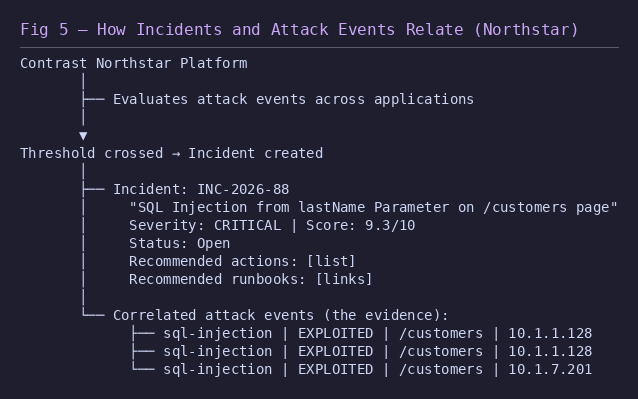
The incident data model
Field | What it tells you | Example |
Incident ID | Unique identifier | INC-2026-88 |
Incident Name | Human-readable description |
|
Summary | Detailed description of what happened | Descriptive text about the incident scope and impact |
Severity | Platform-assessed severity | CRITICAL |
Score | Numeric risk score | 9.3 (out of 10) |
Status | Current state |
|
Related Rules | Which attack types are involved |
|
Recommended Actions | What the platform suggests you do | Remediation steps |
Recommended Runbooks | Links to response procedures | Runbook URLs |
Example alert
CRITICAL — Contrast ADR Incident
Incident: INC-2026-88
Name: SQL Injection from lastName Parameter on /customers page
Score: 9.3 / 10
Status: Open
Related: sql-injection (3 attack events)
Actions: [See recommended actions in Contrast console]
Console: https://app.contrastsecurity.com/Contrast/... (direct link to incident)
--- Correlated attack events ---
1. sql-injection | EXPLOITED | /customers | 10.1.1.128 | PRODUCTION
2. sql-injection | EXPLOITED | /customers | 10.1.1.128 | PRODUCTION
3. sql-injection | EXPLOITED | /customers | 10.1.7.201 | PRODUCTION
Response playbook
Open the Contrast console link — review the incident summary and recommended actions
Review the correlated attack events — understand the scope: how many attacks, how many source IPs, which endpoints
Follow the platform’s recommended actions
If recommended runbooks are provided, follow them
Assess whether the attack events indicate an ongoing campaign (multiple source IPs, repeated attempts) or a single incident
Escalate to AppSec with the incident ID and correlated evidence for remediation
If Block Mode is available: enable it for the affected rules and applications
Update the incident status in Contrast console as you progress through the response
Key takeaway
Incidents reduce alert fatigue by letting the platform do the first round of correlation and prioritization. Instead of triaging individual exploit alerts, your SOC receives pre-assembled investigations, in the form of Incidents, with the evidence already attached and recommended next steps. This is how ADR scales — the platform handles the volume, the analyst handles the judgment.